
Max Payne Mobile
| Developer | Rockstar Games |
| Updated | Jun 2, 2026 |
| Size | 1.4 GB |
| Version | 2.1.131 |
| Requirements | 9 |
| Get it on |  |
Description
Max Payne Mobile delivers the genre-defining Bullet Time mechanic — slow-motion gunplay where time bends around you while your aim stays sharp — fully rebuilt for Android touchscreens with HD textures and haptic feedback. This post is written for first-time players and returning fans who want to squeeze the most out of every shootout, aiming mode, and story twist in this Rockstar Games release. Below, this post covers Bullet Time, the complete control system, the three-part noir story, the Rockstar Social Club progression layer, the most effective aiming mode setup, and the most common mistakes that kill runs before the final chapter.
What Is Max Payne Mobile and How Does It Play
Max Payne Mobile is a story-driven third-person action-shooter developed by War Drum Studios and published by Rockstar Games. It is a complete mobile port of the original 2001 game — same levels, same weapons, same story beats — rebuilt with touchscreen controls, HD resolution, and adjustable graphic settings for Android phones and tablets. The game runs on a single-player campaign structure. There are no multiplayer modes. However, it connects to the Rockstar Games Social Club for stat tracking and unlockables.
The story follows Max Payne, a fugitive undercover cop framed for murder and hunted by both the mob and other police officers. Max is fighting to clear his name. At the same time, he is uncovering the truth behind the murder of his family. The campaign is split into three parts. Each part contains multiple chapters. The tone is dark, cinematic, and relentlessly driven by plot twists. Remedy Entertainment, the original developer, used a comic book panel format for cutscenes. This format carries over into the mobile version exactly as it appeared in 2001.
How Bullet Time Slows Combat and What It Lets You Do
Bullet Time is the signature mechanic of this game. When a player activates it, time in the game slows to a crawl. Enemies freeze mid-action. Max, however, still aims and reacts in real time. This creates a sharp imbalance in the player’s favour. Players can line up shots, track moving targets, and dodge incoming fire — all while the world around them barely moves. The Bullet Time meter drains as it runs. Killing enemies refills it faster. So aggressive play rewards players more than passive cover-based movement.
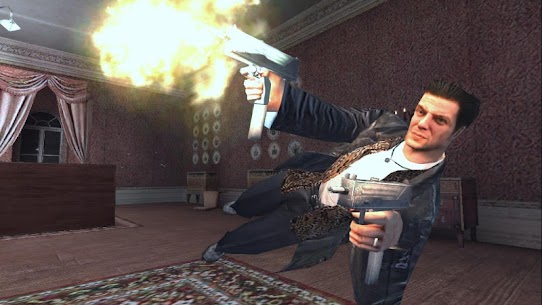
The meter also connects to the shoot-dodge manoeuvre. When Max leaps sideways or forward, Bullet Time activates automatically during the dive. This is the Bullet Time Combo mechanic. However, if players perform a shoot-dodge without already being in Bullet Time, it ends the slow-motion effect. Because of that, timing matters. Understanding when to dive versus when to stand and shoot is the central skill the game builds throughout its campaign.
The Noir Setting, Story Premise, and Three-Part Structure
The game opens in New York City on a night in 1998. Max Payne returns home to find that Valkyr addicts — users of a military-grade drug called Valkyr — have murdered his wife and newborn daughter. This event sets the story in motion. Max spends the entire campaign hunting the people responsible. He fights through organised crime families, corrupt officials, and ultimately the inner circle behind the Valkyr conspiracy. The story is dark. It does not soften its subject matter. However, it remains one of the most narratively focused action games ever ported to Android.
The three-part structure means each section introduces new locations, new enemy types, and escalating story revelations. Part one establishes Max’s situation and the crime network. Part two deepens the conspiracy. And part three delivers the confrontation. The pacing is tight. Most players finish the full campaign in six to eight hours. However, higher difficulty settings extend that significantly.
How Max Payne Mobile Compares to Other Android Shooters
The two most direct mobile competitors in this genre are Overkill 3 and Slaughter 3: The Battle Continues. Overkill 3 uses an on-rails cover system — players do not move freely between rooms. Instead, the game places Max behind cover automatically and requires timed shooting windows. Max Payne Mobile, by contrast, gives players full movement control. That distinction is significant. Freedom of movement makes this game considerably harder but also more rewarding than rail-based shooters.
Slaughter 3 offers free movement too, but its story is minimal. Max Payne Mobile’s strength is specifically the combination of Bullet Time mechanics and a genuine narrative. Players are not just clearing enemy waves. They are advancing a plot. For players who have finished Overkill 3 or Slaughter 3 and want a mobile shooter that demands more tactical thinking and delivers a full story, this title holds a clear advantage.
How Gameplay Mechanics and Controls Work on Android
War Drum Studios rebuilt the control scheme entirely for touch input. On a touchscreen device, the left side of the screen handles Max’s movement via a virtual joystick. The right side handles camera rotation and aiming. A separate Bullet Time button sits prominently in the layout. Shooting is handled by a dedicated fire button. Players can also use auto-aim, which removes some of the pressure from touchscreen aiming accuracy.
The control layout is fully customisable. Players can move every button to a preferred position on screen. They can also adjust button size and transparency. Sensitivity settings for both camera speed and aiming speed are available in the options menu. These settings matter more in Max Payne Mobile than in most mobile shooters, because the game’s combat is fast-moving and punishing at higher difficulty levels.
Primary Movement, Shooting, and the Shoot-Dodge Manoeuvre
Max moves with the left virtual joystick. Shooting requires tapping the fire button with the right thumb while the camera is already tracking an enemy. The shoot-dodge is performed by tapping a dedicated dive button. Max then leaps in the direction of movement while firing. During the dive, time slows briefly. This gives players a window to aim and fire mid-air. However, landing from a shoot-dodge leaves Max briefly vulnerable. So players should not dive into open areas without a clear exit angle.
Weapon switching happens by tapping the weapon icon on screen. Max carries multiple weapons simultaneously. Players manage a small inventory across pistols, shotguns, sub-machine guns, and heavier automatic weapons. Each weapon behaves differently in Bullet Time. Shotguns deal massive damage per shot during slow motion. Automatic weapons shine in extended room clears. Players who switch weapons actively instead of sticking to a single gun will move through the campaign with fewer deaths.
All Three Aiming Modes and When to Switch Between Them
The game offers three auto-aim settings: soft, light, and hard. Soft auto-aim locks onto the nearest visible enemy automatically. Players aim in a general direction, and the game snaps the reticle to the target. This setting makes the game significantly easier. Most players new to touch-based third-person shooters should start here. Light auto-aim provides a smaller snap window. Hard auto-aim provides no snap at all — players aim manually with the touchscreen, which is genuinely difficult given the camera sensitivity.
Turning off auto-aim entirely is possible, but the results are frustrating on phones. The Gamecritics review of the Android version noted that manual aiming becomes nearly unmanageable in fast encounters. Soft auto-aim is the recommended default for all beginners. Players who find the game too easy on soft should switch to light, then hard. This creates a natural difficulty curve within a single playthrough. The aiming mode setting lives inside the options menu and can be changed between levels.
What Happens When You Clear a Chapter or Defeat a Boss
Completing a chapter triggers a brief loading transition and moves Max into the next area with his current weapon inventory intact. This detail is critical. Max does not restart with a default loadout between chapters. Therefore, players who exhaust their ammunition before a chapter ends will enter the next chapter severely undergunned. Picking up enemy weapons consistently — even weapons Max already carries — ensures the inventory stays stocked.
Boss encounters follow a similar rule. After defeating a boss, Max retains whatever weapons and painkiller supply he carried into the fight. Painkillers are the health recovery system in this game. Max does not regenerate health automatically. Instead, players collect painkiller bottles scattered across each level. Finding and keeping painkillers before a boss encounter is often the difference between surviving and restarting.
What the Touchscreen Control System Offers Players
The touchscreen control system was built specifically for this mobile port. It did not simply copy the original PC layout. War Drum Studios redesigned button placement for one-handed and two-handed thumb play on phones. Tablet players get a wider layout with more spacing between controls. Both layouts are customisable. This means players can match the button positions to their natural thumb reach rather than adapting to a fixed layout.
The options menu also contains a tutorial system that walks through each control input for first-time players. The tutorial covers movement, shooting, Bullet Time activation, and the shoot-dodge. Players who skip it often struggle with the shoot-dodge timing. Returning to the tutorial from the options menu is possible at any point. This is worth doing before the first major combat section of Part One.
How the Customisable Layout Works on Phones and Tablets
Button customisation opens through the options menu before or during a session. Players drag each button — move stick, fire, Bullet Time, dodge, weapon switch — to any position on the screen. Scaling buttons up makes them easier to hit quickly in fast combat. Scaling them down keeps more of the screen visible. Transparent buttons reduce visual clutter during cutscenes that flow directly into combat sections.
On tablets, the wider screen allows more comfortable placement. Many tablet players move the movement joystick to the lower left corner and the camera area to the lower right, matching a traditional gamepad feel. On phones, especially smaller screens, reducing the joystick size and centering the Bullet Time button within the right thumb’s natural reach tends to produce the most responsive combat feel.
Haptic Feedback and GameStop Controller Support
The Immersion Haptic Vibration Feedback system sends physical vibration pulses through the device during shooting, impacts, and Bullet Time activation. On devices that support it well — the Samsung Galaxy Note and HTC One X being strong examples — haptic feedback significantly increases the physical feel of gunplay. Players who find touch-only play too disconnected from the action should enable haptic feedback through the options menu.
The game also supports the GameStop Wireless Game Controller and select USB gamepads. Controller play changes the experience considerably. Physical buttons remove touchscreen latency from combat. Players who have a compatible controller will find hard auto-aim suddenly manageable. The controller maps all functions including shoot-dodge and Bullet Time to physical buttons, which improves timing precision in fast encounters.
Adjustable Graphic Settings and NVIDIA Tegra 3 Optimisation
Players with non-Tegra devices can still run the game, but will see the baseline HD texture set. NVIDIA Tegra 3 quad-core devices — including the ASUS Eee Pad Transformer Prime and the HTC One X — receive additional anisotropic texture filtering and enhanced lighting effects. These additions affect surface sharpness at distance and the depth of shadow volumes in interior environments. The snowfall sequences in Part One look noticeably more detailed on Tegra 3 hardware.
Players experiencing framerate drops on older devices should lower graphic settings through the options menu first. Reducing shadow quality produces the largest performance gain. Texture detail is the second setting to reduce. Most supported devices maintain smooth gameplay at medium settings. The game’s visual style — dark, interior-heavy, with frequent cinematic lighting — means reduced settings still produce a presentable image.
What the Bullet Time Combat System Does in Each Situation
Bullet Time does not function identically in every encounter. Its effect changes depending on the number of enemies, the room size, and whether Max is moving or stationary. In tight corridor fights with two or three enemies, Bullet Time allows players to clear a room with near-perfect accuracy. In open-area fights with multiple enemy positions, the slow-motion window requires faster decisions. The meter drains more rapidly in large encounters because players need to fire more shots before enemies drop.
The Bullet Time meter is shared between regular activation and shoot-dodge use. This creates a resource management layer. Players who repeatedly dive without killing enemies will drain the meter without benefiting from slow-motion accuracy. The most effective Bullet Time use combines activation with a clear line of sight to two or more grouped enemies, then chains kills to keep the meter from depleting mid-room.
How Triggering Bullet Time Changes Enemy Behaviour
Enemies do not freeze completely during Bullet Time. They slow significantly, but they continue to aim and fire at Max. Bullets fired at Max also slow, but they still connect if Max does not move. Therefore, activating Bullet Time without also moving or taking cover does not make Max invincible. The system requires active dodging. Players who stand still and fire during Bullet Time will still take damage, particularly in late-game encounters where enemies carry automatic weapons with fast fire rates.
Additionally, triggering Bullet Time mid-room in the wrong position can lock players into a slow-motion encounter with no cover nearby. Moving to a doorframe or a wall corner before activating Bullet Time gives Max a hard edge to work from. Most of the game’s interior rooms are designed around this geometry. Corners and doorframes appear at regular intervals in the level design specifically because the Bullet Time system rewards players who use physical cover during slow motion.
How Shoot-Dodge Extends or Ends Bullet Time
The shoot-dodge and Bullet Time interact differently depending on order of operation. If Max is already in Bullet Time and then performs a shoot-dodge, the dive extends the slow-motion effect through the Bullet Time Combo mechanic. However, if the player performs a shoot-dodge without first activating Bullet Time, the dive triggers a brief slow-motion window and then ends it immediately upon landing. So players who open with a dive instead of the Bullet Time button will burn their meter faster.
The correct sequence in most encounters is: activate Bullet Time first, fire at the closest enemy, then shoot-dodge sideways while still in slow motion to reposition. This sequence maintains the slow-motion effect and moves Max to a new angle simultaneously. It also refills a portion of the meter through the kill made before the dive. Players who reverse the sequence — diving first, then activating — get a shorter window and lose positioning advantage.
Best Weapon Types to Use During Bullet Time Sequences
Shotguns produce the highest per-shot damage during Bullet Time. Because time is slow, the pump-action delay between shots becomes negligible. One pump-action shot at close range during slow motion eliminates most standard enemies immediately. Sub-machine guns work well in longer Bullet Time chains where multiple enemies are spread across a room. The continuous fire allows small damage corrections without needing perfect aim.
Pistols are effective for conserving shotgun and sub-machine gun ammunition. The dual pistol configuration — when Max carries two pistols simultaneously — fires faster and works well during moderate Bullet Time chains. Molotov cocktails and grenades have limited use in Bullet Time because their arc and delay mean they often land after the slow-motion window closes. Players should save explosives for clustered enemies in open areas outside of Bullet Time rather than using them during slow-motion sequences.
How Progression and Unlockables Work in Max Payne Mobile
The game does not use an experience point system or skill tree. Progression is linear. Max moves through chapters in a fixed order. Each chapter advances the story. There are no side missions and no open world. Completing a chapter automatically saves progress. Players can also manually save at any point during a level. The Rockstar Games Social Club integration adds a secondary layer to progression through stat tracking.
Players who connect to the Rockstar Games Social Club through the game’s options menu gain access to stat tracking, achievement records, and unlockable cheats. The cheats function differently from what many players expect. They are not activated mid-game. Instead, they are tied to Social Club milestones. Completing specific actions in the campaign — such as clearing certain chapters or hitting headshot thresholds — unlocks cheats inside the Social Club interface.
How the Three-Part Chapter Structure Advances the Story
Part One covers Max’s immediate situation after the murder of his family and his entry into the organised crime network hunting the Valkyr drug. Part Two expands the conspiracy and introduces the corrupt government layer behind Valkyr’s creation. And part Three delivers the confrontation with the conspiracy’s leadership. Each part contains between five and eight chapters. The chapter format means progress is granular. Players who only have short sessions can complete one or two chapters and return to the save point later.
However, the chapter system does create one specific risk. If players save over a progress file incorrectly — for example, using quick save at a point of near-death — they can lock themselves into a very difficult restart point. The game tracks both a quick save slot and a manual save slot. Players should use the manual save before entering any chapter they expect to be long or difficult. This prevents the progress-loss scenario that the quick save slot creates.
What Rockstar Social Club Tracks and Unlocks on Mobile
The Social Club on mobile tracks headshots, total kills, accuracy percentage, deaths, and chapter completion times. These stats are visible inside the Social Club interface within the game. The headshot count matters most for unlockable cheats, which become available after reaching specific headshot milestones. Players who ignore headshot targeting — relying instead on body shots with auto-aim — will progress through the story but miss these unlocks.
The unlockable cheats include options for weapon inventory loading and other gameplay modifiers. Rockstar notes in the game’s description that players using the Skip to Level feature should carry weapons in their inventory before skipping, because the game starts the new level with whatever weapons Max currently holds. Social Club connectivity also ensures these records persist across devices if a player reinstalls the game.
What Starting a Level with the Right Weapons Accomplishes
The weapon carry-over system between chapters rewards players who collect and hold specific weapons. Starting a chapter with a shotgun and a sub-machine gun already in inventory means the early section of that chapter — before Max reaches the first weapon pickup — is survivable at all difficulty levels. Players who enter chapters with only pistols in inventory face a harder opening section because pistol damage output is lower.
Before using the Skip to Level function, players should ensure Max holds at least one shotgun and a full stock of painkiller bottles. This preparation directly affects how far into the new chapter they survive on the first attempt. The Skip to Level cheat is the one area where player preparation before using it has a measurable effect on the outcome.
What Aiming Mode Settings Players Commonly Get Wrong
The most common early error in this game is switching off auto-aim without first developing touch-based aiming accuracy. Experienced players from PC shooters often disable auto-aim immediately. On a touchscreen without physical sticks, this creates a precision gap that makes mid-game chapters extremely punishing. The game is designed for touch input, and the soft auto-aim setting is not a crutch — it is the intended baseline control experience for the mobile version.
The second common error involves camera sensitivity. Many players leave sensitivity at default and never adjust it. Default sensitivity is too high for most phones. The result is that small thumb movements during fast combat send the camera rotating past targets. This is the source of the camera jumpiness that early reviewers noted. Reducing camera sensitivity by thirty to forty percent in the options menu solves this immediately.
Why Soft Auto-Aim Changes the Difficulty Significantly
Soft auto-aim snaps the reticle to the nearest enemy within a wide cone in front of Max. This means that even imprecise thumb swipes on the camera result in a locked-on target. Players can then focus on timing their shots, managing Bullet Time, and positioning rather than on manual aiming accuracy. For story-focused players who want to experience the narrative without repeated deaths in combat sections, soft auto-aim is the correct setting.
Hard auto-aim provides no snap. This setting is appropriate for players who want the closest experience to the original PC version and are willing to develop touchscreen aiming accuracy over time. However, on phones — especially smaller screens — hard auto-aim significantly increases the death rate in the game’s harder Part Three chapters. Players who switch to hard auto-aim should expect to replay several chapters multiple times before clearing them.
Why Hard Auto-Aim Creates Precision Problems on Touchscreens
Touchscreens register thumb input across a surface area rather than a precise point. This means that placing the thumb on the camera control area creates a small registration zone, not a pixel-accurate input. Hard auto-aim requires players to position the camera reticle precisely on enemy hitboxes. Because the camera responds to touch area rather than touch point, small variations in thumb placement produce different camera angles than intended.
The result is that hard auto-aim works best on larger tablet screens with more camera control surface area, and significantly worse on compact phone screens. Players who want manual aiming should use a compatible USB gamepad or the GameStop Wireless Game Controller. Physical analog sticks produce the precise input that hard auto-aim requires. On touch-only devices, light auto-aim offers a reasonable middle ground between snap assistance and manual control.
How Adjusting Sensitivity Settings Fixes Camera Jumpiness
Camera sensitivity in the options menu directly controls how far the camera rotates per unit of thumb movement. Default settings are calibrated for moderate screens. On high-DPI screens or large tablets, default sensitivity can feel too fast. Reducing it slows the camera rotation rate, which makes tracking moving enemies easier and prevents the overswing issue that causes Max to turn past targets.
Aiming sensitivity is a separate setting from camera sensitivity. Camera sensitivity affects how fast the view rotates when looking around. Aiming sensitivity affects the fine-aim joystick that some aiming modes use independently. Players should adjust camera sensitivity first. If targeting still feels imprecise after reducing camera sensitivity, then reduce aiming sensitivity as a second step. These two adjustments together produce a control feel much closer to a dedicated handheld gaming device.
Best Max Payne Mobile Tips and Tricks for Beginners
Starting with the right settings before the first chapter saves significant frustration. Set auto-aim to soft, reduce camera sensitivity by at least thirty percent, and enable haptic feedback if the device supports it. This baseline setup removes the three most common sources of early-game death — missed shots, overswing camera, and disconnected combat feel. Additionally, complete the tutorial from the options menu even if it appears optional. The shoot-dodge input timing is not intuitive on first contact, and the tutorial covers it directly.
Resource management matters in this game in ways that many mobile shooters do not require. Max does not regenerate health. Painkillers are finite per level. Players who use painkillers the moment health drops will often enter the final section of a chapter without any recovery available. Instead, use painkillers only when health drops below one-third. This habit carries through the entire campaign and prevents the scenario of entering a Part Three boss fight with no painkiller supply.
How to Pair Bullet Time Activation with the Shoot-Dodge in Each Room Clear
The most effective room clear sequence in Max Payne Mobile is: enter the doorframe, activate Bullet Time before stepping into the room, fire at the first visible enemy, then shoot-dodge to the side wall. This sequence uses the Bullet Time Combo to maintain slow motion through the dodge and arrives at a covered position while at least one enemy is already eliminated. Players who step into a room before activating Bullet Time lose the element of surprise and face full-speed enemy fire for the opening moment of the encounter.
Practice this sequence in Part One where enemy counts are lower and the consequence of a failed room clear is less severe. By Part Two, the sequence should feel automatic. The game rewards consistent use of this pattern with faster chapter completion times and lower painkiller consumption, because enemies get fewer opportunities to land shots on Max when Bullet Time is active from the first moment of each room entry.
Why Carrying the Right Weapons Before Using Skip-to-Level Changes Outcomes
The Skip to Level feature starts each new chapter with Max’s current inventory. This is not a reset. Entering a chapter with only a pistol means Max faces the chapter’s early section — often its hardest cluster of enemies before the first weapon pickup — with the lowest damage output available. Specifically, the later chapters in Part Two and Part Three open with large enemy groups carrying automatic weapons.
Before using Skip to Level on any chapter beyond Part One, ensure Max holds a shotgun and a sub-machine gun. If the inventory only shows pistols, play through the preceding chapter’s opening section to collect heavier weapons before triggering the skip. This single preparation step prevents the most common difficulty spike that early players encounter when using Skip to Level without thinking about inventory state.
How to Stop Camera Drift Ruining Shots During Fast Enemy Encounters
Camera drift occurs when the thumb moves slightly across the camera control area without the player intending a camera rotation. During fast enemy encounters — particularly the corridor sections in Part Two — this drift causes Max’s reticle to slide off target mid-burst. The solution is a two-part fix. First, reduce camera sensitivity in the options menu. Second, develop the habit of lifting the camera thumb completely between shots rather than resting it on the screen between fire presses.
Resting the thumb on the camera area registers continuous micro-inputs. The game interprets these as camera rotation commands. Lifting the thumb removes all micro-input and holds the camera at its current angle until the next deliberate camera move. Players who combine reduced sensitivity with thumb-lift discipline between shots will find that shot accuracy in fast encounters improves measurably within two or three chapters of practice.
Frequently Asked Questions About Max Payne Mobile
Is Max Payne Mobile available on Android?
Max Payne Mobile is available on Android through the Google Play Store, published by Rockstar Games. The game supports a wide range of Android phones and tablets, including devices from Samsung, HTC, Motorola, and Sony. It costs $2.99. Players need approximately 1.33 GB of free storage for the download and data installation.
How long does it take to finish Max Payne Mobile?
Max Payne Mobile’s story campaign takes approximately six to ten hours to finish, depending on difficulty setting and familiarity with the original game. The three-part structure covers multiple chapters per part. Players on soft auto-aim move faster. Players attempting the campaign on harder settings with manual aiming can extend total playtime beyond ten hours.
Does Max Payne Mobile support controllers?
Max Payne Mobile supports the GameStop Wireless Game Controller and select USB gamepads on Android. Controller support maps all in-game functions including Bullet Time activation and shoot-dodge to physical buttons. Players using a compatible controller will find hard auto-aim significantly more manageable than on touchscreen-only input.
Why Max Payne Mobile Remains One of Android’s Best Story Shooters
Max Payne Mobile is built for players who want a complete narrative alongside their combat. It does not offer multiplayer, ongoing seasonal content, or free-to-play progression. Instead, it delivers a finished six-to-ten hour story campaign with a combat system — Bullet Time — that remains mechanically distinct from every other Android shooter currently available. Players who want a mobile third-person shooter that rewards tactics and tells a genuine story will not find a better option in its genre on Android.
The game suits players who are comfortable spending $2.99 for a self-contained experience without any additional purchases. It also rewards players who invest time in the control settings. The out-of-box defaults are not optimal, but ten minutes of sensitivity and aiming mode adjustments produce a control setup that makes the Bullet Time system genuinely satisfying on a touchscreen. After playing through the full campaign and adjusting the control settings, my honest verdict is that the shoot-dodge and Bullet Time combination still creates moments of cinematic tension that most mobile shooters cannot replicate. Max Payne Mobile has earned its place on Android, and for action-shooter fans, it is worth every second of the campaign.
Images


What's new
General bug fixes and improvements





Latest Games
Popular Games


