
Rally Fury – Extreme Racing
| Developer | Refuel Games Pty Ltd |
| Updated | Mar 18, 2026 |
| Size | 175 MB |
| Version | 1.121 |
| Requirements | 6.0 |
| Get it on |  |
Description
Rally Fury Extreme Racing rewards players who treat every corner as a fuel stop — the drift mechanic feeds the nitro boost system in real time. This post is written for Android and iOS players who have just downloaded the game or are stuck in mid-campaign events. You will find full coverage of the drift-to-boost loop, the A, B, and S class vehicle system, the Credits and Tokens upgrade economy, the Division multiplayer structure, and the replay tool that most players never use. By the end, you will know exactly where most beginners lose time and how to stop it.
Rally Fury Extreme Racing Overview
Rally Fury Extreme Racing is a free-to-play mobile rally title developed by Refuel Games Pty Ltd, available on Android, iOS, and Android TV. The game launched in 2017 and has accumulated over 120 million downloads. Its appeal comes from a tight loop of drifting, boosting, and upgrading that rewards consistent play without demanding heavy spending.
The game’s tone sits firmly in arcade territory. Races take place across six named maps — Country Hills, Tropical Island, Desert Canyon, Alpine Mountain, The Circuit, and Green Fields — each with day and night variants, rain conditions, and both forward and reverse track layouts. That variety keeps each of the 100-plus single-player events feeling different. However, there is no narrative campaign or story progression. The focus stays on racing performance and vehicle improvement.
How the drift-to-boost system works in Rally Fury
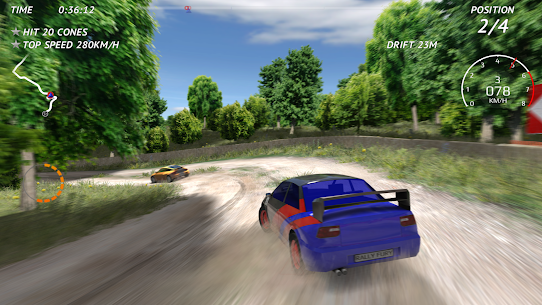
Drifting in Rally Fury is not just a style choice. Every sustained slide around a corner actively charges your nitro gauge. The longer and more controlled the drift, the more boost you bank for the next straight. This drift charge loop is the entire foundation of competitive lap times in the game. Players who treat drifting as optional will always run slower than those who treat it as the primary fuel mechanic.
Nitro boost then deploys in a short burst that pushes top speed well beyond normal acceleration limits. However, the boost window is brief — roughly two seconds per charge. So the goal on every corner is to maintain the slide long enough to fill the gauge, then exit clean and fire the nitro on the straight. Mastering that entry-to-exit window separates A Class performance from S Class pace.
The off-road setting and arcade racing tone
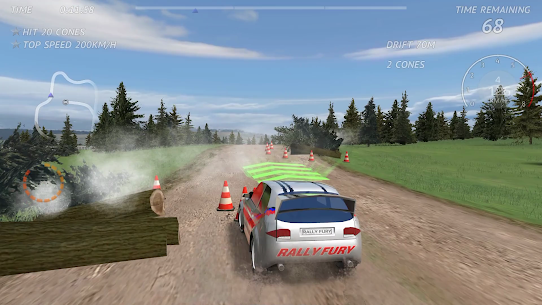
Rally Fury runs its physics across dirt, asphalt, sand, and snow surfaces. Each surface changes how cars slide and how long the drift charge window lasts. Dirt gives the loosest feel and the easiest drift entry. Asphalt tightens grip significantly, so drifts require more deliberate steering input. Sand sits between the two. Snow conditions can extend slides unpredictably, which rewards cautious corner entry.
The art style favors clean and colorful track environments over hyper-realistic visuals. Refuel Games built the game for mobile performance first, so it runs smoothly on mid-range Android devices. Despite the arcade presentation, the underlying physics respond meaningfully to upgrades — better handling and tyres do change how the car behaves on each surface type.
How Rally Fury compares to CarX Rally and Rush Rally 3 on Android
CarX Rally and Rush Rally 3 are the closest mobile alternatives in the same genre. CarX Rally emphasizes simulation-adjacent physics with more complex car setups and a steeper control curve. Rush Rally 3 leans into stage-based rally timing and requires a stronger grasp of braking zones. Rally Fury sits between the two — it is more forgiving than either at entry level, but still rewards precision at higher event tiers.
The drift-to-boost system is also unique to Rally Fury in this mobile category. Neither CarX Rally nor Rush Rally 3 ties drifting directly to nitro accumulation. That mechanic gives Rally Fury a reward rhythm that feels closer to arcade kart racing than traditional rally simulation, which makes it more accessible for players new to off-road racing games on Android.
Rally Fury Gameplay Mechanics and Controls
Controls in Rally Fury are fully customizable before you enter your first race. The settings screen lets you choose between tilt steering and touch steering. Manual or automatic acceleration each suit different player styles. Brake Assist and Steering Assist can be added independently, which makes the game accessible for complete beginners without forcing experienced players to use training aids.
The HUD layout, control sensitivity, and opacity are all adjustable. That level of control customization is rare in mobile rally games at this price point. Gamepad support extends the experience further — most Android controllers connect without additional setup. Android TV support means the game also plays on a large screen via an external controller, which changes the feel significantly compared to portrait-mode mobile play.
Steering options — tilt, touch, and gamepad input
Tilt steering uses the phone’s accelerometer to steer by physically tilting the device. It suits players who want a more natural analog feel but demands a steady hand in longer drift sequences. Touch steering uses on-screen buttons and gives sharper directional control, particularly useful for cone attack events where precision matters more than feel.
Gamepad input is the most consistent option for players serious about fast lap times. A physical analog stick offers the granular steering angle control that the drift charge window rewards. For Android TV play specifically, a gamepad is effectively mandatory. The sensitivity slider for each input method lets you fine-tune the steering response to match your personal driving style on any surface.
The nitro boost activation and boost flame system
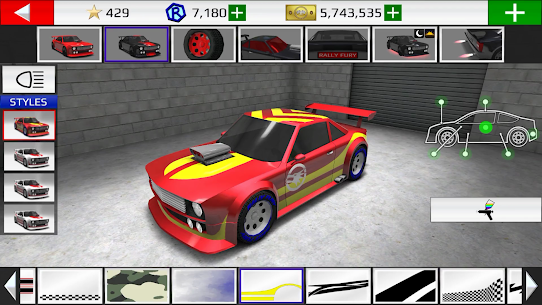
Nitro boost activates via an on-screen button the moment your gauge is charged. The boost flame cosmetic — unlocked through car customization — is purely visual but appears during every boost activation. Players use it to distinguish their vehicle in multiplayer lobbies. Functionally, boost duration and boost strength are both upgradeable stats in the Upgrade Shop, so investing Credits into nitro performance directly extends how long each activation lasts.
Boost pads appear on some track variants and interact with the same nitro system. Hitting a boost pad from further distance is one of the effects unlocked by the Boost booster item, which costs Tokens to activate per race. That booster is temporary — it expires after one race — so it is best saved for higher-reward events where the prize Credits justify the Token cost.
What happens when a race wreck or track reset occurs
Hitting a wall or solid obstacle at high speed triggers the wreck animation — a slow-motion impact sequence that costs several seconds of race time. The wreck resets the car back on track, but the time lost can be decisive in close AI races. Hard crashes are not always avoidable on new tracks, however, so recognizing wall proximity on unfamiliar corners matters more than aggressive speed entry.
A separate reset triggers if the player leaves the racing surface for too long. The game gives a short countdown before automatically placing the car back on track. Both the wreck penalty and the off-track reset share the same consequence: lost time and potentially lost race position. However, a controlled off-track moment that avoids the full wrecking penalty recovers faster than a wall impact.
Single-Player Events and Game Modes in Rally Fury
The single-player campaign contains over 100 events spread across the game’s six maps. Events are broken into day and night conditions and span all four surface types — dirt, asphalt, sand, and snow. Each event awards stars based on finishing position, and those stars contribute to unlocking later events and to the overall star count that eventually opens Division multiplayer access.
Every event lists a recommended vehicle class before you enter. Racing an A Class car against an S Class event is possible but significantly harder. The game does not block lower-class entries, so players occasionally underprepare and wonder why AI opponents feel dominant. Matching the recommended class — or exceeding it — keeps races competitive without requiring perfect driving execution.
Standard race events and AI opponent difficulty
Standard race events pitch the player’s rally car against up to several AI opponents across a fixed number of laps. AI difficulty scales with event tier — early events in Green Fields feel noticeably easier than late-campaign Desert Canyon races. The AI opponents make mistakes, but they also respond to the player’s position, which means blowing a corner while leading invites an immediate challenge.
Stars earned per event range from one to three based on finishing position. A first-place finish earns all three. Second earns two. Third earns one. Third place still pays Credits, so grinding early events for currency is a valid early-game strategy. However, spending too long on low-reward events slows the progression toward B Class and S Class vehicles.
Challenge modes — Cone Attack, Pursuit, and Skills Test
Cone Attack tasks players with hitting numbered cones in sequence while driving at speed. Missing a cone in the required order breaks the run. It rewards precision over raw pace and is one of the best ways to practice controlled steering without the pressure of AI opponents. Players who spend time in Cone Attack early tend to develop cleaner corner entries for standard race events.
Pursuit requires the player to catch and pass an opponent within a time limit. The target vehicle typically runs at a class-appropriate pace, so the challenge lies in maintaining boost efficiency across every corner. Skills Test events focus on specific driving abilities — clean exits, consistent lines, or obstacle avoidance — and each one pays Credits regardless of score, making them reliable income sources for early-game upgrades.
Checkpoint mode and Free Drive explained
Checkpoint mode strips away opponents entirely. The player races through a series of checkpoints against a countdown timer. Missing a checkpoint or running out of time ends the run. It is the purest test of the drift-to-boost loop because there is no AI pressure — the car’s upgrade level and the player’s corner execution are the only variables. Personal best times recorded here carry over as stats.
Free Drive removes all objectives. The player picks a car, picks a track, and drives without any time or scoring pressure. It is the most effective way to learn a new map’s corner sequence before committing to a competitive event. Refuel Games included Free Drive specifically so players can build surface familiarity before risking race stars on an unfamiliar track layout.
Vehicle Classes and Car Selection in Rally Fury
Three vehicle classes divide the garage into clear performance tiers. A Class cars are the starting point for all new players — they are available from the beginning and are the required class for Division 1 multiplayer. B Class vehicles cost three to four times more than their A Class counterparts but deliver meaningfully better stats across speed, handling, and boost potential. S Class represents the top tier, with pure rally performance and the highest price tags in the garage.
Eight distinct rally vehicles appear across the three classes. Each car carries a different stat profile — some favour top-end speed, others prioritize handling and drift response. The game flags each car’s strengths clearly in the selection screen, so players can match the vehicle’s characteristics to the surface type of the event they are about to enter.
A Class, B Class, and S Class vehicle differences
A Class cars are competitive through the early and mid campaign. However, they reach stat upgrade limits faster than higher-class vehicles. Once all five upgrade stats hit maximum on an A Class car, further performance gains require purchasing a B Class vehicle. That transition is the most significant spending decision in the game. Saving Credits for a B Class vehicle rather than buying cosmetic upgrades speeds this milestone considerably.
S Class vehicles unlock the game’s fastest competitive ceiling. They cost significantly more than B Class models and are recommended for Division 3 multiplayer and the hardest single-player events. However, an S Class car with no upgrades will often underperform a fully upgraded B Class car on shorter technical tracks. Class alone does not determine race outcome — upgrade investment matters equally.
How each car’s stats affect drift and nitro performance
Each vehicle’s stat profile directly influences the drift-to-boost loop. A car with low handling stats exits drifts less cleanly, which shortens the window for nitro accumulation. A car with high boost stats extends each nitro activation duration. Therefore, the two most important upgrade paths for players focused on the drift system are handling and nitro. Acceleration and engine upgrades matter most on long straights and asphalt tracks.
Tyre upgrades affect grip across all surface types simultaneously. On snow and sand surfaces specifically, tyres are the upgrade that most changes vehicle response. A rally car with maximum tyre rating slides more predictably, which lets players plan drift entries earlier and hold charges longer. For players struggling on sand or snow events, tyre investment often solves more problems than engine or acceleration spending.
When to buy a new car versus upgrading your current one
The general rule across three years of Rally Fury community experience is this: upgrade first, buy second. A fully upgraded A Class vehicle beats an unupgraded B Class car on most early-to-mid campaign events. Upgrades are cheaper per performance gain than new car purchases, especially in the first half of the event list. So, the Credits-efficient path is to max one A Class car’s stats before buying a B Class vehicle.
The exception occurs when the game explicitly restricts an event to B Class or higher. Some events require a specific class and will not accept a lower-tier entry. At that point, purchasing a B Class vehicle becomes mandatory rather than optional. Saving enough Credits for a mid-range B Class car before encountering those locked events avoids the frustrating grind of replaying lower-tier events for emergency funds.
Car Upgrades and In-Game Currency
Credits and Tokens are the two currencies in Rally Fury. Credits are the primary earnable currency — every race, challenge mode, and event completion pays Credits based on finishing position. Tokens are rarer and function as the premium currency. Tokens can be earned in small amounts through daily login bonuses and specific events, but they are also available through in-app purchase for players who want to accelerate progression.
Spending Credits happens in two places: the Upgrade Shop and the Car Purchase menu. The Upgrade Shop is where all five performance stats — engine, acceleration, handling, nitro boost, and tyres — are individually improved using Credits. Car purchases require either Credits for standard vehicles or Tokens for specific premium models. Understanding which currency buys what prevents accidental Token spending on items that Credits could cover.
How Credits and Tokens are earned in Rally Fury
Every race finish pays Credits. First-place finishes pay significantly more than lower positions, so targeting events where first place is achievable — rather than grinding third place on too-hard events — accelerates income. Daily login bonuses add Credits starting at 1,000 on day one, increasing by 1,000 per consecutive day. Five consecutive days earns 5,000 Credits and 5 Tokens as the day five reward. That daily streak is one of the most reliable Token sources in the game without spending real money.
The Double Credits booster, purchasable with Tokens, doubles all Credit earnings for one race. Using it on a high-paying event maximizes its value considerably. The Max Out booster upgrades the car to maximum stats for one race — useful for clearing a class-restricted event before the player can afford the permanent upgrade investment. Both boosters expire after a single race completion, so timing their use on high-reward events matters.
The five upgrade stats — engine, acceleration, handling, nitro, and tyres
Engine upgrades raise the car’s raw top speed on straights. Acceleration improvements reduce the time to reach that top speed after corners, wrecks, or track resets. Handling changes how precisely the car responds to steering input through corners. Nitro upgrades extend boost duration and increase peak speed during each activation. Tyre upgrades improve grip stability across all four surface types simultaneously.
Each stat has a visible upgrade bar with a MAX indicator. Once MAX appears, no further investment is possible for that stat on that vehicle. Because five stats all compete for limited Credits, a priority order helps: handling and tyres first for most tracks, nitro second, then engine and acceleration for events with longer straights. Asphalt tracks shift that priority toward engine and acceleration, where straight-line speed matters more than drift charge efficiency.
Daily login bonuses and booster packs explained
Daily login bonuses reset if a player skips a day. The counter returns to day one regardless of how long the streak ran. Therefore, completing at least one event per day is the minimum maintenance commitment to keep the bonus growing. The day five payout of 5,000 Credits plus 5 Tokens represents the best routine income available without spending real money.
Booster packs provide temporary advantages at a Tokens cost. Three types exist: Double Credits for earnings, Max Out for temporary full upgrade performance, and the Boost pad distance extender. Each expires after one race. Players who activate a booster on a low-reward event waste the Tokens investment. Saving boosters for high-difficulty events with maximum Credit payouts is the most efficient use of the premium currency.
Division Multiplayer and Private Lobbies
Multiplayer in Rally Fury unlocks after accumulating enough stars from single-player events — approximately 20 stars is the commonly cited threshold. Once active, multiplayer organizes competitive races into Division tiers. Division 1 accepts A Class vehicles and is aimed at players newer to online racing. Division 2 opens A Class and B Class entries. Higher Division numbers require higher-class cars and award larger prize Credits for top finishes.
The Division system prevents experienced players with S Class cars from consistently entering beginner lobbies, which maintains competitive balance across tiers. However, players can join Custom lobbies and Friend-hosted races with any car regardless of Division class restrictions. That flexibility makes private lobbies useful for testing higher-class tracks without risking ranked Credits earnings on an underpowered vehicle.
How the Division tier system works and when multiplayer unlocks
Division numbering runs higher as tier increases — the larger the Division number, the stronger the competition and the better the reward pool. Each Division match races the same format as single-player events but against real opponents rather than AI. Connection quality affects race smoothness, so online performance can vary on mobile networks compared to Wi-Fi. Refuel Games routes multiplayer through standard online matchmaking without dedicated regional servers.
Multiplayer races pay Credits based on finishing position, similar to single-player. However, prize Credits in Division 2 and above outpace most mid-campaign single-player events, which makes competitive multiplayer one of the fastest ways to earn currency once a player’s car is class-appropriate. Finishing last in Division 2 still pays more than winning most early A Class single-player events.
Racing against global players versus private lobby races with friends
Public Division races match the player against random opponents of similar tier worldwide. Queue times vary by region and time of day. Private lobbies, by contrast, allow the player to invite specific friends or share a lobby code for a closed race group. Private lobbies do not enforce Division class restrictions, so mixed-class races are possible in friend groups.
The race replay tool is available after both single-player and multiplayer races. It records the full race and allows camera switching between the player’s vehicle and opponent vehicles. Fast-forward and slow-motion playback both work in replay. This makes the replay system a practical analysis tool — watching a competitor’s line through a corner in slow motion reveals where time is being lost on that particular track section.
The race replay tool — switching cameras and slow-motion review
Replay mode stores the most recent completed race automatically. The player can switch to any competitor’s camera perspective, which reveals exactly how faster opponents are timing their drift entries and nitro activations. Slow-motion playback at key corners shows the car’s body angle during the drift window — a visual confirmation of whether the drift charge was held long enough before corner exit.
Fast-forward through straightline sections and slow-motion on corners is the most efficient replay review method. Additionally, watching an AI opponent’s replay in a race the player lost reveals whether the gap was caused by better drift execution or simply by a higher-class vehicle. That distinction matters because it tells the player whether the solution is practice or a car upgrade purchase.
Advanced Racing Tactics and Hidden Features
The features most players never use sit behind the replay system and the Quick Race custom settings menu. Quick Race lets the player set rain or sun conditions, toggle day or night, switch to reverse track layout, set opponent skill level, and choose opponent car class — all independently. That combination of variables means Quick Race functions as a full practice environment for any surface and condition combination without spending Stars on campaign events.
Surface-specific handling is another area where players underestimate the depth. Rally Fury’s physics engine responds to surface transitions within a single track — a track that starts on asphalt and transitions to dirt mid-section changes the drift window at that exact point. Players who understand that transition prepare a different steering angle for the corner immediately following the surface change.
Using the drift charge window to enter corners earlier
The drift charge window opens the moment the car begins a sideways slide. Most beginners wait until the apex of a corner before starting their drift, which shortens the available charge time. Entering the drift earlier — before the corner’s natural apex — gives more track distance during the slide, which fills the nitro gauge more fully before corner exit.
However, early entry requires more steering correction on corner exit to avoid understeer into a wall. The balance between early entry and clean exit is the core skill that separates fast laps from average ones. Practising that timing on Green Fields and The Circuit tracks — which have the widest corners — before attempting tighter Desert Canyon sequences builds the muscle memory needed for technical surface types.
How surface type — dirt, asphalt, sand, snow — changes car handling
Dirt allows the longest and most controllable drift entries. It is the easiest surface to build consistent nitro charges on because the car responds predictably to steering input throughout the slide. Asphalt grips harder, which means the car resists entering a drift until higher speed. On asphalt, braking later before corner entry helps provoke the drift faster, but the shorter slide window means the nitro charge rarely fills completely.
Sand tracks behave similarly to dirt but with slightly less predictable exit angles. Snow is the most challenging surface — the car can oversteer past the intended exit line without much warning. On snow events, tyre upgrades matter more than on any other surface. Also, because snow slides run longer, the nitro gauge fills faster, which means players who accept the instability can actually build more boost per corner than on any other surface type in the game.
Getting more from the replay system to study racing lines
Most players open replay once, watch from their own camera, and close it. The full value of the system requires switching to an opponent’s camera and watching a section the player knows they lost time on. Finding the section where the AI opened a gap — and then watching that section from the AI’s perspective — identifies whether the opponent drifted earlier, exited cleaner, or simply had a higher-class vehicle.
Slow-motion is most useful at the corner entry point. Pausing mentally at the moment the rival car begins its drift compared to the moment the player’s car began its drift in the same corner reveals the entry timing gap. Even a half-second earlier entry on a long corner can produce a meaningfully fuller nitro charge. Over the course of a multi-lap race, that timing difference compounds into multiple seconds of gap.
Best Rally Fury Extreme Racing Tips and Tricks for Beginners
Start drifting before the apex to earn a fuller nitro charge
The drift charge window rewards total time spent sliding, not just the angle of the slide. Starting the drift before the corner’s apex rather than at it adds additional track length to each charge. On tracks with wide sweeping corners — like the long turns in Country Hills — an early drift entry can fill the nitro gauge completely before corner exit. Doing that consistently across a full lap eliminates the need to hold boost back for the final straight.
Practice early entry on Free Drive first. Because Free Drive removes all scoring pressure, players can deliberately enter corners at various points and observe how the nitro gauge responds. Three or four laps of deliberate early entry practice in Free Drive translates directly into faster times on the same track in competitive events. This also builds the steering correction reflex needed for a clean exit after a longer drift.
Match your car class to the event’s recommended class before spending Credits
Each event displays a recommended vehicle class before entry. Racing below that recommendation is possible but the AI opponents scale to the event tier, not to the player’s class. An A Class car in a B Class-recommended event will typically finish last regardless of driving quality. Spending Credits to upgrade the current car to maximum stats before attempting a higher-class event is more efficient than buying a new car impulsively.
Also, check whether the event explicitly requires a class tier rather than just recommending one. Required-class events block entry to lower-tier vehicles entirely. Knowing whether an event is class-restricted or class-recommended before approaching it prevents wasted race attempts and unnecessary Credit grinding. The event description screen displays this information before the player commits to entry.
Avoid hard wall impacts — a wreck costs more time than a missed drift
The wreck animation is Rally Fury’s most punishing game mechanic for beginners. A hard wall impact triggers slow-motion and resets the car’s track position, which typically costs three to five seconds of race time. That loss is rarely recoverable in close AI races. However, players often try to maximize speed into corners to compensate for weaker cars, which increases wall contact risk.
A slower, cleaner corner approach that avoids the wreck penalty almost always produces a faster race time than an aggressive approach that risks a wall impact. The drift charge loop means corner entry speed is less critical than corner exit cleanliness. Prioritising exit over entry — by entering slightly slower and focusing on a straight exit line — reduces wrecks significantly and keeps the nitro charging on the next straight rather than watching the slow-motion reset animation.
Frequently Asked Questions About Rally Fury Extreme Racing
Is Rally Fury Extreme Racing free and available on iOS and Android?
Rally Fury Extreme Racing is free to download on both Android via the Google Play Store and iOS via the App Store. The game uses an in-app purchase model for Credits and Tokens packs, but the full single-player event list and all core game modes are accessible without spending real money. Android TV support is also included at no additional cost.
Can Rally Fury Extreme Racing be played offline?
Yes. Single-player modes — including Race, Cone Attack, Pursuit, Skills Test, Checkpoint, and Free Drive — all function without an internet connection. Cloud Save requires connectivity to sync progress across devices. Online multiplayer, both Division-ranked matches and private lobby races, requires an active internet connection. The offline single-player experience covers the majority of the game’s 100-plus events.
Does Rally Fury Extreme Racing have multiplayer and how does it work?
Rally Fury includes online multiplayer that unlocks after earning approximately 20 stars in single-player events. Division-ranked matches organize players by vehicle class tier. Division 1 accepts A Class cars while higher Division numbers require B Class or S Class vehicles. Private lobbies let players race friends without class restrictions, and both modes pay Credits for finishing positions.
Final Verdict — Who Should Play Rally Fury Extreme Racing
Rally Fury Extreme Racing suits mobile players who want a rally racing game with real mechanical depth but without the steep learning curve of simulation titles like CarX Rally. The drift-to-boost loop is the game’s strongest feature — it turns every corner into an active decision rather than a passive steering adjustment. The A, B, and S class vehicle system provides a clear and motivating progression path, and the 100-plus single-player events give solo players significant content without requiring multiplayer access.
From personal time with the game, the moment Rally Fury clicks is when the nitro gauge fills on a held drift and the boost fires cleanly onto a straight — it is a satisfying feedback loop that holds up across dozens of races. Players who enjoy optimizing that loop will find the upgrade economy rewarding rather than frustrating. This is one of the strongest free-to-play rally racing experiences on Android and iOS.
Images


What's new
New desert canyon races Added extra decal placements Bug Fixes




Latest Games
Popular Games


